- Button to show and hide environments
- Refactored hook storing state of hidden environments
- Changed the way flag is triggered for feature overview
- Visual updates for new page look

---------

Co-authored-by: Thomas Heartman <thomas@getunleash.io>
This PR moves the flag page header into a separate file, so that the
overview file is more clearly focused on the overview.

Additionally, it moves the modals that are triggered from the header
into the new file. This should give a nice little performance boost, as
opening and closing these modals should no longer trigger a re-rendering
of the full flag overview page, only the header.
https://linear.app/unleash/issue/2-2834/plausible

Adds the following Plausible events to the Release management feature:
 - Add plan
 - Start milestone
 - Remove plan
 - Create template
 - Edit template
 - Delete template
This PR fixes a bug wherein the list of tags to remove from a group of
tags wouldn't be correctly updated.

## Repro steps
- Add a console log line to
`frontend/src/component/feature/FeatureView/FeatureOverview/ManageTagsDialog/ManageBulkTagsDialog.tsx`'s
`ManagebulkTagsDialog`. Log the value of the`payload` variable.
- Pick a flag with no tags.
- Add tag A -> before submitting, you should have one added tag and zero
removed flags. After submitting, both should be empty.
- Now remove tag A -> before submitting, you should have one removed tag
and zero added tag. After submitting, both should be empty
- Notice that removed flags hasn't been emptied, but still contains tag
A.
- Now add tab B -> before submitting, you should have tag B in added and
nothing in removed. Notice that tag A is still in removed.


## Discussion points

This gives us both a `clear` and a `reset` event, which is unfortunate
because they sound like they do the same thing. I'd suggest renaming the
`clear` event (because it doesn't really clear the state completely),
but I'm not sure to what. Happy to do that if you have a suggestion.

I have not tested that submission of the form actually resets the state.
I spent about 45 minutes looking at it, but couldn't find a way that was
sensible and worked (considered spying: couldn't make it work;
considered refactoring and extracting components: think that's too much
of a change). I think this is benign enough that it can go without a
test for that thing actually being called.

I did, however, test the different reducer commands.
As of PR #8935, we no longer support both text and title, and confetti
has been removed.

This PR:
- removes `confetti` from the toast interface
- merges `text` and `title` into `text` and updates its uses across the
codebase.
- readjusts the text where necessary.
https://linear.app/unleash/issue/2-3038/release-plans-misc-ux-improvements
Includes various UX improvements focused on release plans:
- **New milestone status:** Introduced a "Paused" status for milestones.
A milestone is marked as "Paused" when it is active but the associated
environment is disabled.
- **Status display:** Paused milestones are labeled as "Paused (disabled
in environment)" for clarity.
- **Styling cleanup:** Removed unused disabled styling in the release
plan component.
- **Accordion stability:** Fixed visual shifting in milestone accordions
when toggling.
- **Strategy count:** Updated the "View Strategies" label to reflect the
total number of strategies in the milestone.
- **Edge case handling:** Improved rendering for milestones without
strategies.
- **Component extraction:** Refactored milestone status into a
standalone component.
- **Component organization:** Grouped milestone-specific components
under a `ReleasePlanMilestone` parent folder.
- **Template card cursor enhancement:** Set the cursor on the template
card to "pointer", so we better reflect the interactivity of the
element.
- **Template card created by enhancement:** Added an avatar for the
"Created by" field in release plan template cards, replacing the
creator's ID.
- **Navigation improvement:** After creating or editing a release plan
template, users are now redirected back to the release management page.


Hooks up the project status lifecycle data to the UI. Adds some minor
refactoring as part of that effort.

## Other files

There's been some small changes to
`frontend/src/component/feature/FeatureView/FeatureOverview/FeatureLifecycle/FeatureLifecycleStageIcon.tsx`
and `frontend/src/hooks/useLoading.ts` as well to accommodate their
usage here and to remove unused stuff. The inline comments mention the
same thing but for posterity (especially after this is merged), the
comments are:

For
`frontend/src/component/feature/FeatureView/FeatureOverview/FeatureLifecycle/FeatureLifecycleStageIcon.tsx`:

> The icon only needs the name to pick.
https://github.com/Unleash/unleash/pull/7049 deliberately changed the
logic so that the completed stage gets the same icon regardless of its
status. As such, to make the icon easier to use other places (such as in
the lifecycle widget), we'll only require the name.

For `frontend/src/hooks/useLoading.ts`:
> There's no reason we should only be able to put refs on divs, as far
as I'm aware. TS was complaining that that a `ul` couldn't hold a div
reference, so I gave it a type parameter that defaults to the old
version.
Addressing some oversights that led to browser console errors.

This PR fixes console errors related to the recently introduced
highlight component (#8643) and tag row component in the new flag
metadata panel (#8663).
Fixes all warnings about the "key" prop. The majority of the fixes fall
into one of the following categories:

- Extracting "key" props in tables (you're not allowed to just spread
them in)
- Adding "key" props to autocomplete options and chips
- fixing test data that didn't contain ids
don't use `act` from `react-dom`. Instead, use act from `react`
directly, as advised by the deprecation notice.

This PR fixes all of the deprecated import warnings, updates some
testing libraries we use (and tests), and fixes one or two other
warnings.
Fixes an issue where the collaborator component would be smooshed
together when you have too many collaborators and too many flag tab
items.
The primary things I have done are:
1. Limit the amount of collaborators we show to 6 instead of 8. I
believe the number 8 was arbitrary, so let's go with 6 for now.
2. Instead of using a fixed gap, use a separator element that grows up
to a certain limit. I've added a `Separator` component, which is an
empty div with flex-grow. It feels like you should be able to do that
with gap too, but I can't think of how right now.
3. Don't allow collaborator component text (or avatars) to wrap. We
don't have a lot of space in this header, so let's keep it tight.
Additionally, I've added the `className` prop to the AvatarGroup
component so that it can be styled externally. I also cleaned up some
naming that was left in while I was at it.
Before:

After:

Extracts the Avatar Group component into a `common` component and adds a
standard tooltip to all avatars.
Relates to linear issue 1-2606
This is a suggestion / proof of concept for how we can solve it. While I
think we can merge this as is, I'd also be happy to take any discussions
on other ways to approach it etc.
## Why are these changes made together?
Because extracting the avatar group without adding the new tooltip data
made the existing tooltip misbehave (it'd show up in the top left of the
screen, not synced to the avatar in any way).
I probably could have (and still can if you think it's prudent) split it
out such that the avatar gets a standardized tooltip first (and disable
it for the group card avatars), and split out the avatars in a
follow-up. Happy to do that if you think it's better.
## What does this mean?
It used to be that we had no consistent way of dealing with avatars and
tooltips. Some places had them, some places didn't. This change makes it
so that all avatars that we can show tooltips for will get the same
tooltip.
Previously, we had at least 4 different ways of dealing with tooltips:
- The HTML tooltip (that would be standardized with this PR) in the
project flags table

- The "title" that you'd get on your user avatar
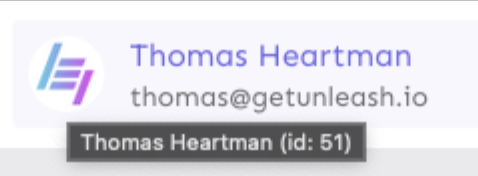
- The group card list tooltip

- And sometimes you'd get nothing at all

with this change, we'll always show the same kind of tooltip if we can:

## What goes in the tooltip?
We use the `UserAvatar` component for a fair few different things and I
didn't want to extract separate components for all the different use
cases. Instead, I wanted to get an overview over what we use it for and
what is relevant info to show.
I found all the places we used it and tried to form an opinion.
This tooltip will work with a user's email, name, username, and id. If
there is no user (such as for empty avatars and avatars displaying only
"+n" for remaining members), we show no tooltip.
Following the example set by the group card avatars, we'll try to use
email or username (in that order) as the main bit of text. If the user
has an email or a username and also a name, the name will be used as
secondary text.
If the user does not have an email or username, but has a name, we'll
use the name as the main text.
If the user does not have an email, a username, or a name, we'll try to
show "User ID: N" if they have an id.
If they do not have a username, a name, an email, or an ID, we bail out
and show nothing.
## Why can you disable the tooltip?
In some cases, you might want to disable the tooltip because you have
more information to feed into it. An example of that is in the project
flags table, where we want to show more information in cases where the
user is 'unknown':

## Additional fixes
This PR also adds a few lines of CSS to fix a minor avatar layout bug.
Before:
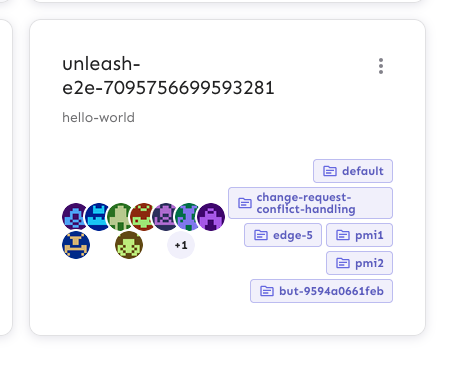
After:

This PR adds the UI part of feature flag collaborators. Collaborators are hidden on windows smaller than size XL because we're not sure how to deal with them in those cases yet.
**Upgrade to React v18 for Unleash v6. Here's why I think it's a good
time to do it:**
- Command Bar project: We've begun work on the command bar project, and
there's a fantastic library we want to use. However, it requires React
v18 support.
- Straightforward Upgrade: I took a look at the upgrade guide
https://react.dev/blog/2022/03/08/react-18-upgrade-guide and it seems
fairly straightforward. In fact, I was able to get React v18 running
with minimal changes in just 10 minutes!
- Dropping IE Support: React v18 no longer supports Internet Explorer
(IE), which is no longer supported by Microsoft as of June 15, 2022.
Upgrading to v18 in v6 would be a good way to align with this change.

TS updates:
* FC children has to be explicit:
https://stackoverflow.com/questions/71788254/react-18-typescript-children-fc
* forcing version 18 types in resolutions:
https://sentry.io/answers/type-is-not-assignable-to-type-reactnode/

Test updates:
* fixing SWR issue that we have always had but it manifests more in new
React (https://github.com/vercel/swr/issues/2373)

---------

Co-authored-by: kwasniew <kwasniewski.mateusz@gmail.com>
1. Only suggest to create a tag value if the input is more than two
characters after trimming.
2. Ignore trailing and leading whitespace when considering which
autocomplete options to show
This fixes the case when a customer have thousands of strategies causing
the react UI to crash. We still consider it incorrect to use that amount
of strategies and this is more a workaround to help the customer out of
a crashing state.

We put it behind a flag called `manyStrategiesPagination` and plan to
only enable it for the customer in trouble.
This PR updates the way we show deleted strategies in the CR UI. Instead
of showing just the strategy name and a diff on hover, we show the same
strategy config as we do for new and updated strategies.

This makes it easier to see what you have deleted.

In doing so, it also fixes two issues:
1. inconsistent border radius for segment changes listed. Due to an
override in `frontend/src/themes/theme.ts`, these would get a border
radius of `theme.shape.borderRadiusLarge` instead of
`theme.shape.borderRadiusMedium`. It does this by adding a class and
making the selector more specific.
2. The background was unset for the strategy rollout box and constraint
item boxes.

It looks like this:

<img width="728" alt="image"
src="https://github.com/Unleash/unleash/assets/17786332/7cba28ac-0454-444d-8cfa-f46543ccf2dc">

<img width="728" alt="image"
src="https://github.com/Unleash/unleash/assets/17786332/832be653-3def-4afc-b72f-36fcd76ad83d">

Or with more kinds of strategies:
<img width="454" alt="image"
src="https://github.com/Unleash/unleash/assets/17786332/f18e5482-7d2e-4cbd-8177-9de6dfb10307">


Note: I'm happy to isolate the color changes to a separate PR if that's
preferable.


