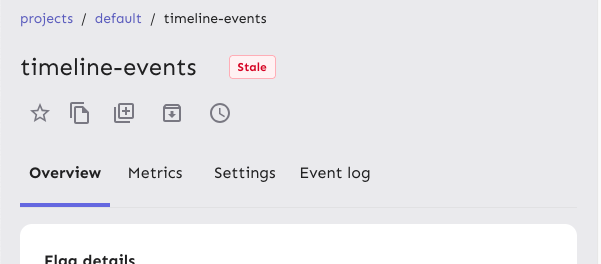
Reduces the size of the tab buttons on the flag page:
- Sets the min width to 100px instead of 160px on md screens. No change
for smaller screens
- Removes the min-height restriction imposed by theme.ts for the tab
bar, instead relying on the tab buttons to determine the height
(effectively changes the height from 70px to 62px).
Additionally: fixes an issue where the action buttons would overlap with
the tab buttons before wrapping and makes the tab bar scrollable. I can
no longer reproduce the issue where the action buttons force the tab bar
to be too small, but even if they should do that now, the tab bar is
scrollable so the remaining tabs are still accessible.
Because we only override the tabs' min-width on wider screens and mui
sets a default min-width, I changed the `onNarrowHeader` function to
`onWideHeader` and adjusted the other components accordingly. As a
bonus, the tab width and header wrapping now happens at the same time 🥳
After the change:

## Accessibility
This PR also addresses some of the a11y issues with this tab bar, namely
that it adds an `aria-label`, as mentioned in the [MUI
docs](https://v5.mui.com/material-ui/react-tabs/#accessibility).
It does **not**, however, connect the tabs to their corresponding tab
panels. The main reason for this is that we're not using tab panels and
that they're spread over 4 different components. We're probably using
the tabs component for something it isn't really designed to do in this
way. (Arguably they should be links and not buttons, for instance.) I'm
not going to touch this now, because that would probably be a lot of
work and it's not something I expect the business would prioritize.
## Changing theme.ts
While it's tempting to go in and change the `min-height` in `theme.ts`,
that would potentially affect all the other tab bars we have (although
maybe not, because we set a different min height for the tabs
themselves), I want to leave that for now. There is apparently some work
being done/prepared for the tabs, so it's probably better to leave that
for then.
Makes it so that the actions/tabs wrap on narrow width screens.
Constraints:
- When wrapping, the actions should go **before** the tabs, when not
wrapping, they should be placed **after**
- Need to maintain a logical tab order for wrapping, so just using
`flex-flow: row wrap-reverse` doesn't work because the tab order will be
wrong
- When the elements switch, you shouldn't lose your tab place in the
document
This solution uses container queries to determine the container size and
uses that to set the wrapping. Falls back to media queries if container
queries aren't supported (it's supported on >93% of browsers according
to caniuse).
The wrapping points don't use predefined media queries because:
- containers don't care about the size of the screen. It's the intrinsic
size of the container that matters.
- wrapping at 900px seemed too far out if container queries are
unsupported. But it's a fallback, so we can switch to that if we want.
If your keyboard focus is on one of the actions on a wide screen, and
the screen goes narrow, your focus will still be after the tabs (staying
consistent), so tabbing to the next element will take you into the flag
details, while backtab takes you back to the tabs.
Before wrapping:

After wrapping:
## A note on accessibility:
The spec for flexbox (taken from [MDN's
doc](https://developer.mozilla.org/en-US/docs/Web/CSS/CSS_flexible_box_layout/Ordering_flex_items))
states:
> "Authors must not use order or the *-reverse values of
[flex-flow](https://developer.mozilla.org/en-US/docs/Web/CSS/flex-flow)/flex-direction
as a substitute for correct source ordering, as that can ruin the
accessibility of the document."
So even if wrap-reverse works visually, it's not a good solution for
this.
- Button to show and hide environments
- Refactored hook storing state of hidden environments
- Changed the way flag is triggered for feature overview
- Visual updates for new page look

---------

Co-authored-by: Thomas Heartman <thomas@getunleash.io>
This PR moves the flag page header into a separate file, so that the
overview file is more clearly focused on the overview.

Additionally, it moves the modals that are triggered from the header
into the new file. This should give a nice little performance boost, as
opening and closing these modals should no longer trigger a re-rendering
of the full flag overview page, only the header.
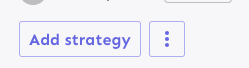
Fixes the height discrepancy between add strategy and more strategies
buttons, both with and without the flag enabled.
The essence of the fix is to make the "more strategies" button's height
dynamic and grow to match the height of the other button.
Before (flag enabled):
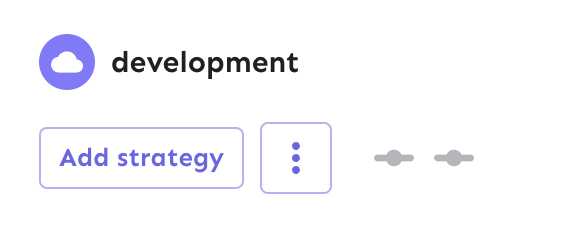
After (flag enabled):

Before (flag disabled):

After (flag disabled):
As a bonus: also enables the ui font redesign flag for server-dev.
If you're very sharp-eyed, you might notice a few things:
1. There's more padding on the new button. This was done in concert with
UX when we noticed there was more padding on other buttons. So as a
result, we set the button type to the default instead of "small".
1. The kebab button isn't perfectly square with the flag on. There's a
few issues here, but essentially: to use `aspect-ratio: 1`, you need
either a height or a width set. Because we want everything here to be
auto-generated (use the button's intrinsic height), I couldn't make it
work. In the end, I think this is close enough. If you have other ideas,
you're very welcome to try and fix it.
https://linear.app/unleash/issue/2-2834/plausible

Adds the following Plausible events to the Release management feature:
 - Add plan
 - Start milestone
 - Remove plan
 - Create template
 - Edit template
 - Delete template
This PR fixes a bug wherein the list of tags to remove from a group of
tags wouldn't be correctly updated.

## Repro steps
- Add a console log line to
`frontend/src/component/feature/FeatureView/FeatureOverview/ManageTagsDialog/ManageBulkTagsDialog.tsx`'s
`ManagebulkTagsDialog`. Log the value of the`payload` variable.
- Pick a flag with no tags.
- Add tag A -> before submitting, you should have one added tag and zero
removed flags. After submitting, both should be empty.
- Now remove tag A -> before submitting, you should have one removed tag
and zero added tag. After submitting, both should be empty
- Notice that removed flags hasn't been emptied, but still contains tag
A.
- Now add tab B -> before submitting, you should have tag B in added and
nothing in removed. Notice that tag A is still in removed.


## Discussion points

This gives us both a `clear` and a `reset` event, which is unfortunate
because they sound like they do the same thing. I'd suggest renaming the
`clear` event (because it doesn't really clear the state completely),
but I'm not sure to what. Happy to do that if you have a suggestion.

I have not tested that submission of the form actually resets the state.
I spent about 45 minutes looking at it, but couldn't find a way that was
sensible and worked (considered spying: couldn't make it work;
considered refactoring and extracting components: think that's too much
of a change). I think this is benign enough that it can go without a
test for that thing actually being called.

I did, however, test the different reducer commands.
As of PR #8935, we no longer support both text and title, and confetti
has been removed.

This PR:
- removes `confetti` from the toast interface
- merges `text` and `title` into `text` and updates its uses across the
codebase.
- readjusts the text where necessary.
This PR removes all references to the `featuresExportImport` flag.

The flag was introduced in [PR
#3411](https://github.com/Unleash/unleash/pull/3411) on March 29th 2023,
and the flag was archived on April 3rd. The flag has always defaulted to
true.

We've looked at the project that introduced the flag and have spoken to CS about it: we can find no reason to keep the flag around. So well remove it now.
https://linear.app/unleash/issue/2-3038/release-plans-misc-ux-improvements
Includes various UX improvements focused on release plans:
- **New milestone status:** Introduced a "Paused" status for milestones.
A milestone is marked as "Paused" when it is active but the associated
environment is disabled.
- **Status display:** Paused milestones are labeled as "Paused (disabled
in environment)" for clarity.
- **Styling cleanup:** Removed unused disabled styling in the release
plan component.
- **Accordion stability:** Fixed visual shifting in milestone accordions
when toggling.
- **Strategy count:** Updated the "View Strategies" label to reflect the
total number of strategies in the milestone.
- **Edge case handling:** Improved rendering for milestones without
strategies.
- **Component extraction:** Refactored milestone status into a
standalone component.
- **Component organization:** Grouped milestone-specific components
under a `ReleasePlanMilestone` parent folder.
- **Template card cursor enhancement:** Set the cursor on the template
card to "pointer", so we better reflect the interactivity of the
element.
- **Template card created by enhancement:** Added an avatar for the
"Created by" field in release plan template cards, replacing the
creator's ID.
- **Navigation improvement:** After creating or editing a release plan
template, users are now redirected back to the release management page.


Hooks up the project status lifecycle data to the UI. Adds some minor
refactoring as part of that effort.

## Other files

There's been some small changes to
`frontend/src/component/feature/FeatureView/FeatureOverview/FeatureLifecycle/FeatureLifecycleStageIcon.tsx`
and `frontend/src/hooks/useLoading.ts` as well to accommodate their
usage here and to remove unused stuff. The inline comments mention the
same thing but for posterity (especially after this is merged), the
comments are:

For
`frontend/src/component/feature/FeatureView/FeatureOverview/FeatureLifecycle/FeatureLifecycleStageIcon.tsx`:

> The icon only needs the name to pick.
https://github.com/Unleash/unleash/pull/7049 deliberately changed the
logic so that the completed stage gets the same icon regardless of its
status. As such, to make the icon easier to use other places (such as in
the lifecycle widget), we'll only require the name.

For `frontend/src/hooks/useLoading.ts`:
> There's no reason we should only be able to put refs on divs, as far
as I'm aware. TS was complaining that that a `ul` couldn't hold a div
reference, so I gave it a type parameter that defaults to the old
version.
Fixes browser console warnings and errors related to the event timeline
and strategy form.

- **Event Timeline**: Addressed a warning where the environment filter
rendered with a default environment value (production) before
environments were fully loaded.
- **Strategy Form**: Resolved an error caused by forwarding the enabled
prop as a boolean.
Addressing some oversights that led to browser console errors.

This PR fixes console errors related to the recently introduced
highlight component (#8643) and tag row component in the new flag
metadata panel (#8663).
The two lints being turned off are new for 1.9.x and caused a massive
diff inside frontend if activated. To reduce impact, these were turned off for
the merge. We might want to look at turning them back on once we're
ready to have a semantic / a11y refactor of our frontend.
Fixes all warnings about the "key" prop. The majority of the fixes fall
into one of the following categories:

- Extracting "key" props in tables (you're not allowed to just spread
them in)
- Adding "key" props to autocomplete options and chips
- fixing test data that didn't contain ids
don't use `act` from `react-dom`. Instead, use act from `react`
directly, as advised by the deprecation notice.

This PR fixes all of the deprecated import warnings, updates some
testing libraries we use (and tests), and fixes one or two other
warnings.
Allow you to edit default strategies in the UI if you have the
update_project or project_default_strategy_write permissions. These are
the same permissions that we use in the API.

Previously, we used the update_feature_strategy permission here, but
that one is intended to be used for updating strategies belonging to
actual flags.

One of the trickier bits here is that we use the `StrategyVariants`
component, which previously had baked in the permission required
(update_feature_environment_variants). Because the permissions are
different for the default strategy, I updated the component to make it
configurable, but for the default to be the old permission (so that
other uses aren't affected).
After we implemented new feature flag creation flow, this are not used
anymore.

Creation is now handled by **CreateFeatureDialog**.

Also edit component can be minified, because it does not need so many
fields anymore.
`groupId` parameter because of the change in validation wasn't parsed
correctly. Intent was to fill it when it is empty, when the form is loaded.
By mistake the same logic applies when you manually remove all
characters from the text field.
Fixes an issue where the collaborator component would be smooshed
together when you have too many collaborators and too many flag tab
items.
The primary things I have done are:
1. Limit the amount of collaborators we show to 6 instead of 8. I
believe the number 8 was arbitrary, so let's go with 6 for now.
2. Instead of using a fixed gap, use a separator element that grows up
to a certain limit. I've added a `Separator` component, which is an
empty div with flex-grow. It feels like you should be able to do that
with gap too, but I can't think of how right now.
3. Don't allow collaborator component text (or avatars) to wrap. We
don't have a lot of space in this header, so let's keep it tight.
Additionally, I've added the `className` prop to the AvatarGroup
component so that it can be styled externally. I also cleaned up some
naming that was left in while I was at it.
Before:

After:

Old versions of Unleash allow for creating "Gradual Rollout" strategies
without `groupId` or `stickiness`. UI will now populate those fields,
not getting stuck when editing strategies without said fields.
Extracts the Avatar Group component into a `common` component and adds a
standard tooltip to all avatars.
Relates to linear issue 1-2606
This is a suggestion / proof of concept for how we can solve it. While I
think we can merge this as is, I'd also be happy to take any discussions
on other ways to approach it etc.
## Why are these changes made together?
Because extracting the avatar group without adding the new tooltip data
made the existing tooltip misbehave (it'd show up in the top left of the
screen, not synced to the avatar in any way).
I probably could have (and still can if you think it's prudent) split it
out such that the avatar gets a standardized tooltip first (and disable
it for the group card avatars), and split out the avatars in a
follow-up. Happy to do that if you think it's better.
## What does this mean?
It used to be that we had no consistent way of dealing with avatars and
tooltips. Some places had them, some places didn't. This change makes it
so that all avatars that we can show tooltips for will get the same
tooltip.
Previously, we had at least 4 different ways of dealing with tooltips:
- The HTML tooltip (that would be standardized with this PR) in the
project flags table

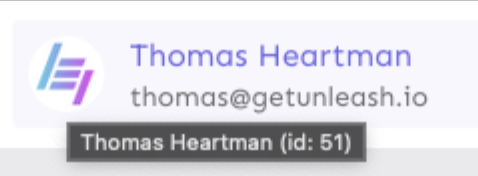
- The "title" that you'd get on your user avatar
- The group card list tooltip

- And sometimes you'd get nothing at all

with this change, we'll always show the same kind of tooltip if we can:

## What goes in the tooltip?
We use the `UserAvatar` component for a fair few different things and I
didn't want to extract separate components for all the different use
cases. Instead, I wanted to get an overview over what we use it for and
what is relevant info to show.
I found all the places we used it and tried to form an opinion.
This tooltip will work with a user's email, name, username, and id. If
there is no user (such as for empty avatars and avatars displaying only
"+n" for remaining members), we show no tooltip.
Following the example set by the group card avatars, we'll try to use
email or username (in that order) as the main bit of text. If the user
has an email or a username and also a name, the name will be used as
secondary text.
If the user does not have an email or username, but has a name, we'll
use the name as the main text.
If the user does not have an email, a username, or a name, we'll try to
show "User ID: N" if they have an id.
If they do not have a username, a name, an email, or an ID, we bail out
and show nothing.
## Why can you disable the tooltip?
In some cases, you might want to disable the tooltip because you have
more information to feed into it. An example of that is in the project
flags table, where we want to show more information in cases where the
user is 'unknown':

## Additional fixes
This PR also adds a few lines of CSS to fix a minor avatar layout bug.
Before:
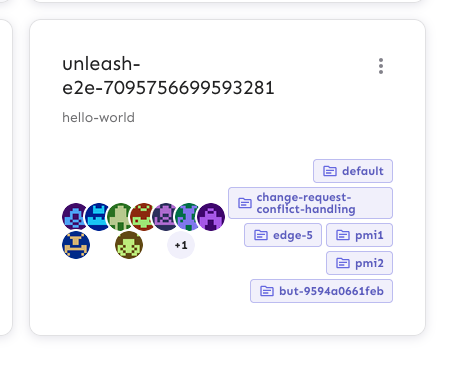
After:

This PR makes the config dropdown list generic over its values, so that
you can pass stuff that isn't strings.

It also updates the existing impression data button to use booleans
instead.
This change makes it so that all form input labels start with a
capital letter, regardless of the data we use to generate them.

Also fixes a leftover toggle -> flag renaming.
This PR adds the UI part of feature flag collaborators. Collaborators are hidden on windows smaller than size XL because we're not sure how to deal with them in those cases yet.
This PR disables the "create feature flag" button when you've reached
the limits.

This one is a little more complex than the other UI limits, because we
also have to take into account the project feature limit. I've tried to
touch as little as possible, but I _have_ extracted the calculation of
both limits into a single hook.


